Pick-to-Light for Odoo Inventory
Odoo pick-to-light without a WMS project. The free, open-source Voodoo Pick to Light Devices addon connects battery-powered wireless display devices straight to Odoo's Transfers: process a pick or a put in Odoo and the devices in those locations light up with the product, quantity and picker color. Press the button on the device and Odoo's Done quantity updates by itself. Odoo stays the system of record; the lights just make the floor faster and more accurate. Details of the hardware are on the pick-to-light system page.
How Pick-to-Light Works Inside Odoo
The addon adds a Voodoo device field to Odoo stock locations and listens to the Inventory app's transfers. Nothing about how you create, reserve or validate transfers changes; the addon only sends device commands and writes confirmations back. Here is the loop.
Assign a device to each Odoo location
Open a stock location, enter the Device ID or scan it with a barcode scanner, and save. The device immediately shows the current on-hand quantity for that location. One device can cover up to eight neighboring locations using arrows, which is how most customers cut the device count.
Process a transfer as usual
When a picking (delivery, receipt, internal transfer or manufacturing component pick) is ready, every device in a source or destination location lights with the product, the quantity to move, and the picker's color and name. Odoo's Job Queue module sends the commands in the background so the user interface never waits.
Picker confirms on the device
The picker takes the quantity and presses the button. The addon writes that quantity to the transfer's Done field. On a multi-button device the picker can adjust the quantity up or down on the spot before confirming — short picks are recorded correctly without touching a screen.
Odoo finishes the transfer
With Done quantities filled in, the transfer validates exactly the way it does today, by hand or automatically. Stock moves, lots, packages and backorders all follow Odoo's own rules, because the addon never bypasses them.
What You Need
Four things, three of which most Odoo warehouses already have.
- Odoo 15.0 to 19.0, self-hosted — on your own server or cloud VM, Community or Enterprise. Odoo Online (the SaaS edition) cannot install third-party addons, and Odoo.sh cannot run the background job runner the addon depends on, so neither is supported.
- The Inventory (stock) app, plus the community
queue_jobmodule (free, from the Odoo Community Association), which runs device commands in a background worker — the reason the addon needs a server you control. - Voodoo wireless display devices and a Turbo II router, connected to a Voodoo server — our cloud or your own. The $5,000 Starter Kit covers ten devices, one Turbo and a year of cloud service.
- The
voodoo_devicesaddon, installed from the Odoo Apps Store or GitHub. Configuration — server address and credentials — is done inside Odoo's Settings, no code changes.
What the Picker Sees
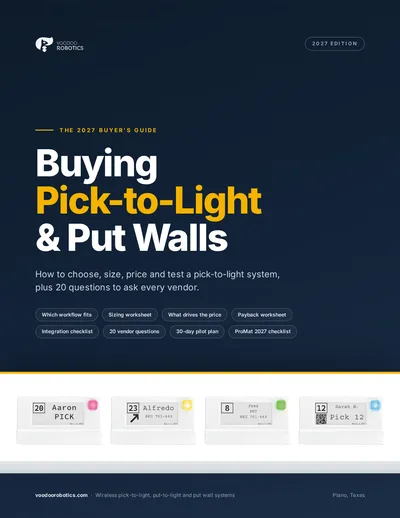
Each Odoo transfer line becomes a command to the device covering that location. The device shows:
- ●The product name or internal reference and the quantity to pick or put, in large type.
- ●The picker's own color and, optionally, the picker's name — so several people can work the same aisle from the same Odoo batch.
- ●An arrow when one device serves several locations, pointing at the right bin.
- ●A barcode or QR code when you want the pick scanned as well as confirmed.
- ●Between transfers, the current on-hand quantity for the location — a live stock label.
Try the display device layouts yourself in the device simulator, or read how the hardware works on the wireless pick-to-light page.
Voodoo and Odoo, Step by Step
Pick Using Odoo Transfers — Voodoo Robotics
With locations set, anytime you use Odoo's Transfers for a Pick or Put, Voodoo Cloud Display Devices in those locations are activated. Acknowledge on the device with the button and the Done quantity updates automatically — or use a multi-button device to adjust the quantity on the spot.
Use Odoo Locations with Voodoo Devices
Adding Voodoo devices to existing Odoo warehouse locations is simple: enter the DeviceID in Odoo and Voodoo takes care of the rest. The device immediately displays current inventory and supports up to eight locations using directional arrows.
Multiple Pickers in Odoo — Not a Problem for Voodoo
Each picker can key on their own LED color in a shared area (current firmware offers thousands of colors). You can even include a picker's name in the pick/put instructions. Overlapping commands on a single Voodoo device are handled seamlessly.
One Voodoo Device for Multiple Locations in Odoo
Use one Voodoo Cloud Display Device for 2, 4, or even 8 locations using directional arrows. This substantially reduces the cost of a Pick To Light system, all seamlessly managed by Odoo.
Where Odoo Pick-to-Light Pays Off
Odoo runs a lot of small and mid-sized warehouses that have never had light-directed picking because the classic systems needed a WMS and an electrician. This removes both.
Ecommerce and wholesale on Odoo
Delivery orders with dozens of lines a day, picked by people who also pack and ship. Lights end the searching, and the Done quantities stop the mis-shipments that cost a customer.
Odoo Manufacturing kitting
Component picks for manufacturing orders light in sequence, so kitting and line-side replenishment come off the paper list. The same devices run put-to-light for putaway of finished goods.
Growing operations with no IT team
Install the addon, scan Device IDs onto locations, and go. There is no integration developer, no middleware and no WMS to license — which is why Odoo is one of the most common Starter Kit pilots.
Odoo Pick-to-Light Questions
Does the Voodoo addon work with Odoo Online or Odoo.sh?+
No. Odoo Online (the SaaS edition) does not allow third-party addons at all. Odoo.sh accepts custom addons but cannot run the OCA queue_job background runner the addon uses to send device commands, so it is not supported either. The addon runs on self-hosted Odoo Community or Enterprise, versions 15.0 through 19.0, on your own server or cloud VM.
Do I need a WMS in addition to Odoo?+
No. Odoo's Inventory app is the system of record, and its transfers are what drive the lights. There is no separate warehouse management system, no middleware and no integration project — the addon is the integration.
Can one display device serve more than one Odoo location?+
Yes. A device can be assigned to as many as eight locations; when a transfer touches one of them, the device shows an arrow pointing at the right bin. Using one device per two, four or six locations is the main lever on system cost, and the Starter Kit is how customers settle the ratio on their own shelving.
Can several pickers work the same zone at once?+
Yes. Each picker gets their own color (the LED supports thousands), and the picker's name can be shown on the device. Overlapping commands on the same device — two pickers needing the same location — queue and display in turn.
Does the addon change how Odoo validates transfers?+
No. It fills in Done quantities when a picker confirms on the device (or adjusts them on a multi-button device). Validation, stock moves, lots, packages and backorders all stay with Odoo's standard logic.
What does Odoo pick-to-light cost?+
The addon is free and open source under LGPL-3. Hardware starts with the $5,000 Proof-of-Concept Starter Kit — ten devices, a Turbo II router, a year of cloud service, integration support and onboarding — and larger systems are quoted per configuration because the device count depends on how many locations each device covers.
See pick-to-light pricing →Odoo Integration Resources
Voodoo Pick to Light Devices, versions 15.0–19.0.
Read, fork or file an issue against the addon.
The original announcement and the four walkthrough videos.
The API the addon uses, for anything custom.
Other ready-made integrations: ShipStation · Extensiv 3PL Warehouse Manager · NetSuite WMS · QuickBooks Online · all WMS pick-to-light integrations
See it running against your Odoo
Book twenty minutes and we'll light devices from a live Odoo transfer while you watch — or send your location count and we'll quote a configuration. Most Odoo customers start with the Starter Kit on one pick zone.
Book a 20-minute call
Pick a time that suits you. We'll look at your pick zones, talk through arrows and device counts, and tell you if a Starter Kit makes sense.
- Your pick zones, SKU mix and order profile
- The arrows ratio that fits your shelving — 1:1, 1:4 or 1:8
- Whether a Starter Kit pilot or a full quote is the right next step
- How the devices talk to your WMS, ERP or Odoo
Prefer email or phone? info@voodoorobotics.com · 972-914-8758
Odoo Already Knows What to Pick. Let It Show Your Pickers.
Install the free addon, scan devices onto locations, and the next transfer lights the floor. No WMS, no wiring, no integration project.