Pick-to-Light for ShipStation
ShipStation already holds every order you are about to ship. The free Voodoo Pick-to-Light for ShipStation Chrome extension sends that order to wireless display devices at each pick location with one click from the order page — no WMS, no API project, nothing to wire. Pickers see the SKU and quantity light up, confirm on the device, and the order goes back into ShipStation's packing and shipping flow exactly as before. It is the fastest route to wireless pick-to-light for a business that runs on ShipStation.
How the ShipStation Extension Lights a Pick
The extension runs in the browser tab where you already work in ShipStation. It reads the order lines on the page and sends them to your own Voodoo server, which lights the devices. ShipStation itself is untouched — no API keys, no store connections, no changes to your workflow settings.
Install and point it at your Voodoo server
Add the extension from the Chrome Web Store, open its options page, and enter your Voodoo server address and login. Choose defaults for color, timeout, beep, and which order fields appear on the devices. That is the whole setup.
Open an order in ShipStation
The extension adds a Voodoo button to the order. Devices have already been assigned to your pick locations once, on the Voodoo server, so every SKU has a home.
Click — the shelf lights up
Each line's device shows the SKU, the quantity and the picker's color, with the picker's name if you turn it on. Because each picker has their own color, several people can pick different orders in the same aisles at the same time.
Pick, press, pack, ship
The picker confirms each line on the device. Back in ShipStation you pack and print the label as usual; the extension never modifies the order, so ShipStation's records, pick lists and reports stay exactly as they were.
What You Need
No WMS and no developer. The list is short.
- A ShipStation account — any plan — used in Chrome or Microsoft Edge (the extension is also loadable in Firefox from source).
- Voodoo wireless display devices at your pick locations and a Turbo II router. The $5,000 Starter Kit (ten devices, one Turbo, a year of cloud service and onboarding) outfits a pack-station or a first pick zone.
- A Voodoo server — our cloud service or your own — where each device is assigned to a location once. Everything after that is driven from ShipStation.
- The free extension from the Chrome Web Store. Source is on GitHub if your IT team wants to read it first.
What the Picker Sees
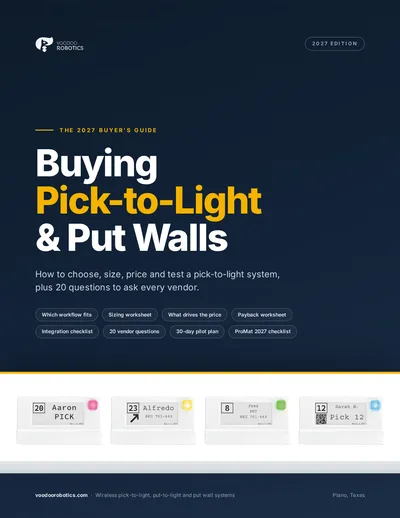
Every line on the ShipStation order becomes a lit device at that SKU's location, showing:
- ●The SKU and the quantity to pick, in large type — plus any other order or shipment fields you choose in the extension's options.
- ●The picker's color, and the picker's name when you enable it, so two people never confuse each other's orders.
- ●A short instruction line you configure once — 'Pick', a channel name, a priority flag.
- ●An arrow when one device covers several adjacent bins.
- ●The confirmation button: press it and the line is done. Nothing in ShipStation changes until you pack the order.
Try the display device layouts yourself in the device simulator, or read how the hardware works on the wireless pick-to-light page.
The Extension in Two Minutes
ShipStation Series Intro — Voodoo Robotics Pick-to-Light
Introduction to the Voodoo Robotics pick-to-light integration with ShipStation, demonstrating how Cloud Display Devices work alongside the ShipStation Chrome browser extension to streamline the packing and shipping workflow.
Who Runs Pick-to-Light From ShipStation
ShipStation users usually do not have a WMS, and until now that meant no light-directed picking. The extension changes the arithmetic: the order is already in the browser, so the lights are one click away.
Ecommerce brands shipping in-house
Fifty to a few thousand orders a day from shelving near the pack bench. The devices replace the printed pick list and the searching, and mispicks stop before they reach the customer.
Multi-channel sellers
Shopify, Amazon, eBay and wholesale orders all land in ShipStation, so all of them light the same shelves the same way — one picking process instead of one per channel.
Pack-station and put wall setups
Batch-pick several orders, then use the same devices as a wireless put wall at the bench: the extension shows which order each item belongs to. When you outgrow it, the hardware carries into a full system with any WMS.
ShipStation Pick-to-Light Questions
Do I need a WMS to use pick-to-light with ShipStation?+
No. The extension reads the order from the ShipStation page in your browser and sends the lines to your Voodoo server, which lights the devices. ShipStation is the only order system involved.
Does the extension change anything in ShipStation?+
No. It adds a Voodoo button to the order page and sends order line details — SKU, quantity, location — to your own Voodoo server. It does not write to ShipStation, does not use ShipStation's API, and collects no analytics.
How does the extension know where each SKU lives?+
Devices are assigned to locations on the Voodoo server once, when you set up the shelving. After that, every order line resolves to the device covering that SKU's location; moving a product means reassigning a device, not touching ShipStation.
Can it work alongside ShipStation's own pick lists and mobile picking?+
Yes. The extension runs from the order page in the browser and leaves ShipStation's pick lists, Mobile Picking and packing screens as they are. Many customers use ShipStation to batch and the lights to execute.
What happens when we outgrow a pack station?+
Nothing is thrown away. The same devices, Turbo and server run the full Voodoo system — zone picking, batch picking, put walls, kitting and pack verification — driven by any WMS or ERP through the REST API, or by one of the other ready-made integrations.
See the full pick-to-light system →What does ShipStation pick-to-light cost?+
The extension is free and open source. Hardware starts with the $5,000 Proof-of-Concept Starter Kit — ten devices, a Turbo II router, a year of cloud service, integration support and onboarding — and larger systems are quoted per configuration.
See pick-to-light pricing →ShipStation Integration Resources
Voodoo Pick-to-Light for ShipStation, v1.2.
The extension's source, including the Firefox manifest.
The announcement, the demo video and the setup guide.
Pack-station setups, results and pricing for ShipStation shops.
Other ready-made integrations: Odoo · Extensiv 3PL Warehouse Manager · NetSuite WMS · QuickBooks Online · all WMS pick-to-light integrations
Light your first ShipStation order this month
Book twenty minutes and we'll click through a live order with the extension — or tell us how many SKU locations you pick from and we'll quote the devices. A pack station is a natural $5,000 Starter Kit pilot.
Book a 20-minute call
Pick a time that suits you. We'll look at your pick zones, talk through arrows and device counts, and tell you if a Starter Kit makes sense.
- Your pick zones, SKU mix and order profile
- The arrows ratio that fits your shelving — 1:1, 1:4 or 1:8
- Whether a Starter Kit pilot or a full quote is the right next step
- How the devices talk to your WMS, ERP or Odoo
Prefer email or phone? info@voodoorobotics.com · 972-914-8758
The Order Is Already in ShipStation. Put It on the Shelf.
One free extension, one click per order, and the right bins light up. No WMS, no wiring, no integration project.